


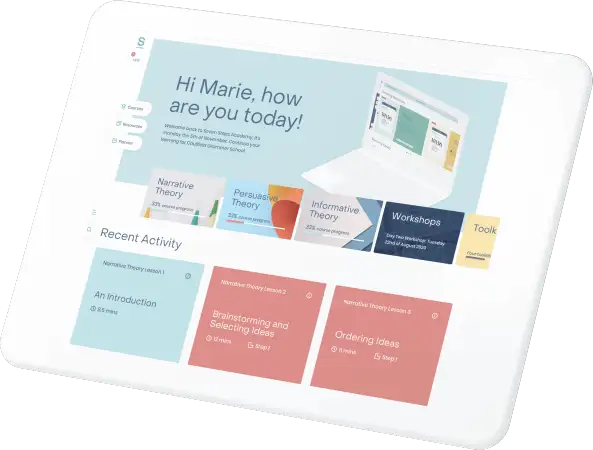
Teach writing with confidence

Our AI assessment tool analyses student writing in minutes and shows you exactly what to teach next. No more guesswork. No more marking marathons.
Every insight links straight to matching lessons, training videos and classroom resources in Teacher Hub. Walk into class knowing exactly what to teach — and how.
Targeted teaching, proven strategies and data at your fingertips. Your students gain the skills, confidence and measurable growth they deserve.
Teaching writing can feel overwhelming, especially
when you don’t know where to start.
But what if every writing lesson felt tailor-made for your students?
Where students of all abilities experience success. Where you know exactly what to teach next.
Where assessment data guides every lesson.
Since 2005, Seven Steps has helped more than 55,000 teachers transform student writing.
Now, with AI-powered assessment, it’s easier than ever to bring that proven approach into your classroom.

Why Seven Steps works
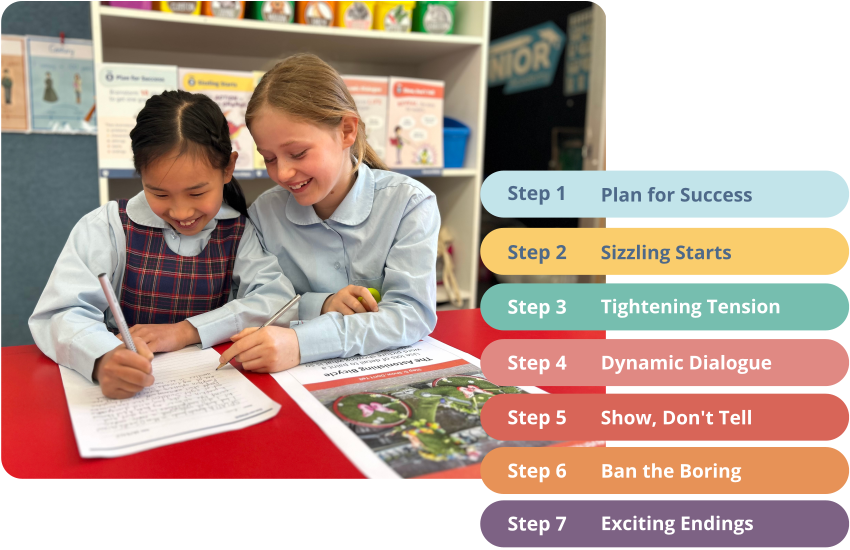
You don’t need to learn the whole program. You can start with the Steps that will make the biggest impact and build from there.
We break writing down into seven techniques that professional authors use – from generating original ideas to crafting a great ending. Students focus on one skill at a time, practise, master, then move on.
You see the change lesson by lesson. It works for every writer in your room – Reluctant, EAL/D, Gifted, ADHD and everyone in between.
And because our AI assessment tool marks against these same techniques, you always know which Step your class needs next – with the training and resources to teach it straight away.
“The level of creativity and freedom has definitely changed. Their level of description has improved a lot and they have that confidence to build up their own little worlds, which is really amazing.”
– Thaisha, Year 3 teacher
Our Lady of the Pines Catholic Primary School
Imagine this …
It’s Monday morning. Your class has just written their first draft. You upload them to the AI assessment tool – within minutes, you know exactly which Step your class needs most.
Instead of planning from scratch, you tap straight into Teacher Hub. There’s a short training video and 2 weeks’ worth of resources all sequenced for you.
You walk into your next writing lesson with everything you need. No guesswork. No late-night planning.
Assessment flows into teaching. Teaching flows into growth. Every part connected and aligned to the same seven techniques.
Your Seven Steps membership
Everything you need to teach writing with confidence – the proven approach, AI-powered assessment
and all the resources, training and support that bring it to life in your classroom.
From Assessment to Action
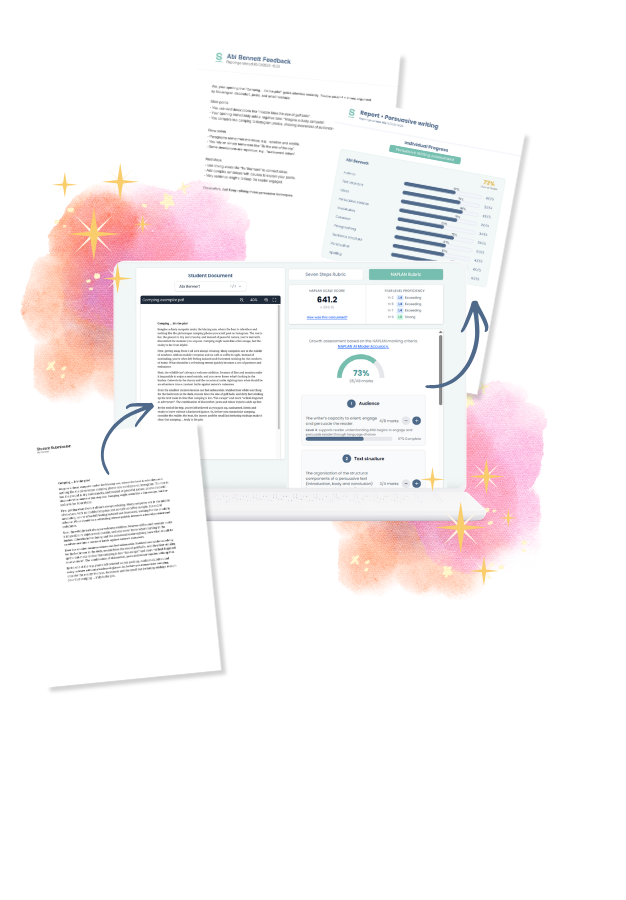
Upload your students’ writing. Our AI assessment tool identifies which Step your class needs next, then links you straight to the training and resources in Teacher Hub to teach it.
Track every student’s growth over time. Generate reports for planning, parent–teacher interviews and leadership.
More than a tool – built on a proven approach
The AI tool helps you assess writing. Seven Steps helps you improve it.
Your Seven Steps membership gives you full access to Teacher Hub – where it all comes together in one place.
AI-powered assessment, on-demand training, hundreds of classroom-ready resources, NAPLAN revision and Read to Write units.
All built on the proven Seven Steps approach teachers have trusted since 2005. All in one annual subscription.
Data-driven teaching at your fingertips, so you can focus on what matters most – your students.
Assess students’ writing, track growth over time and get clear, actionable insights that guide your teaching.

Short, practical on-demand training videos for narrative, persuasive and informative writing – ready when you are.
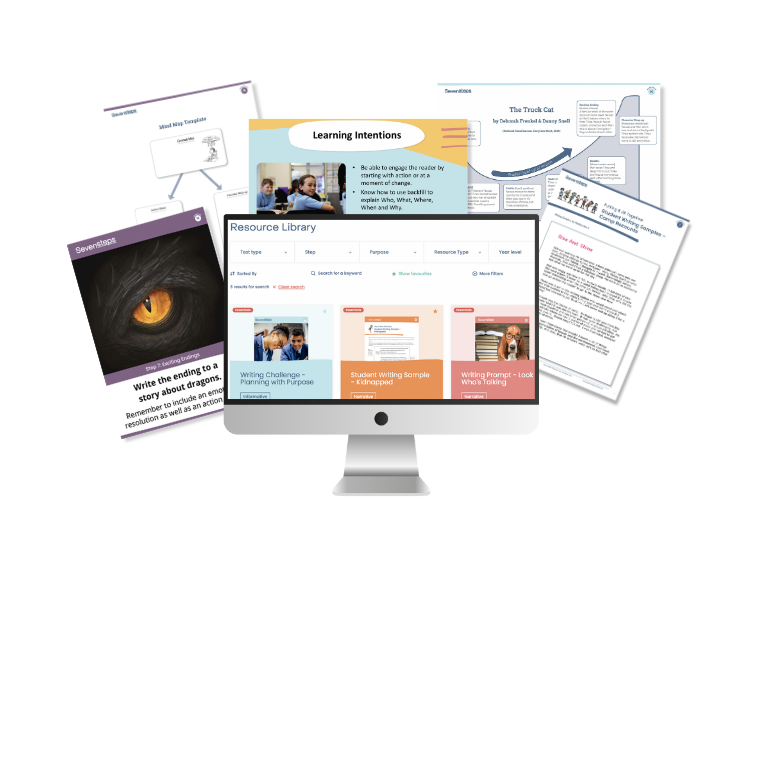
Access 100s of lesson plans, writing prompts, PowerPoints, samples, exemplars, activities and more.
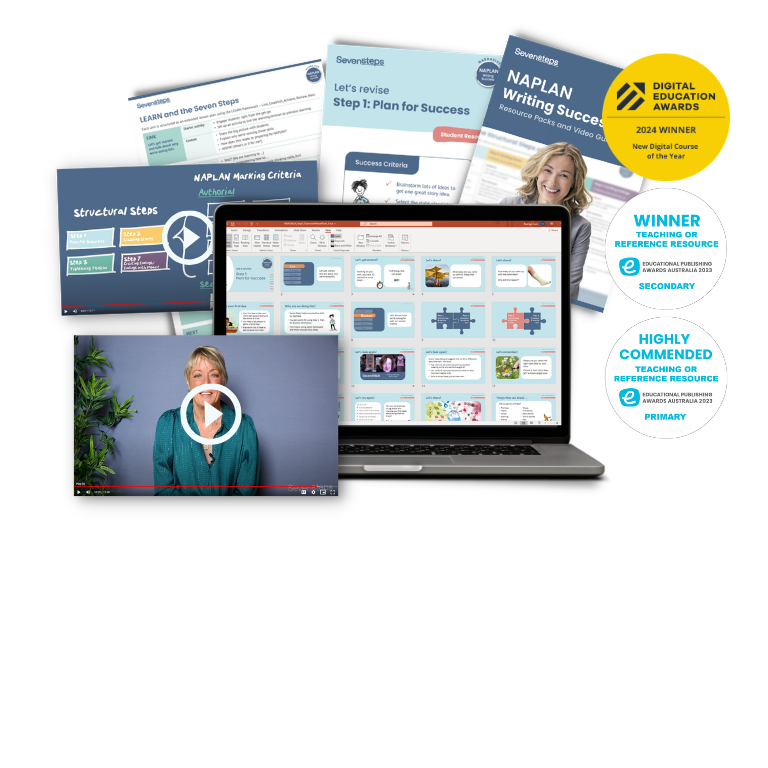
Revision resources that build skills in preparation for the NAPLAN writing task.
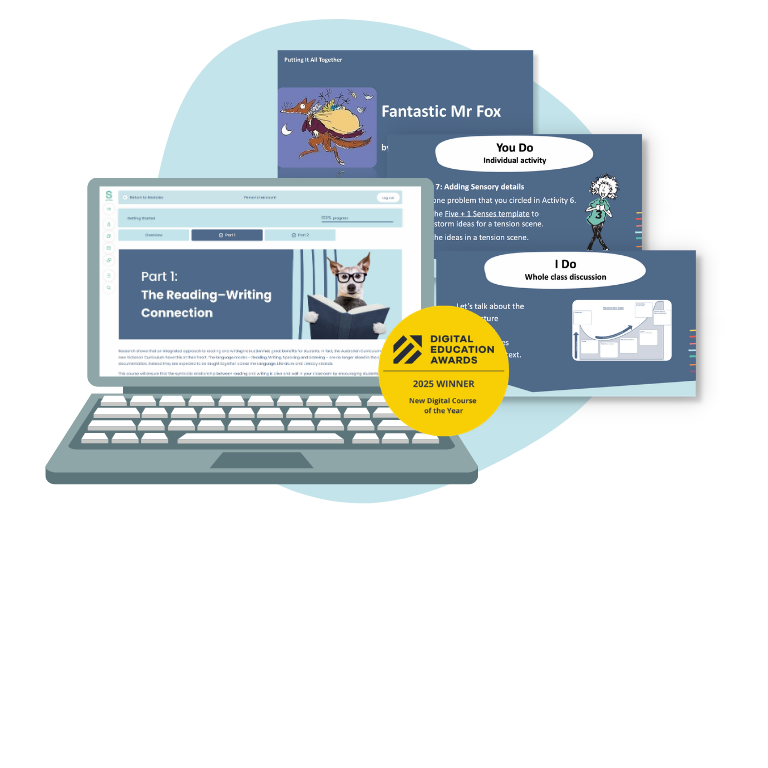
Engaging units for each year level that integrate reading and writing instruction seamlessly.
Our training and resources are award-winning – and teachers love them.

Ready to see it in action?
In a relaxed 30-minute session, we’ll:
- Show you the AI assessment tool in action with real student writing
- Explore the insights and how they inform what to teach next
- Show how the tool links to the training and resources in Teacher Hub
- Answer your questions and explore what would work best for you
Choose how you’d like to get started:
A personalised walkthrough tailored to your classroom or school.
💡 Bring a piece of student writing and we’ll assess it live together.
A relaxed online session with other teachers – a great way to explore the tool, see it in action and ask questions.
Tell us about your class and we’ll send through pricing and what’s included.
Get a tailored quote
A few quick details and we’ll be in touch with pricing and everything you need to get started.
Prefer to start with a workshop?
Join a Seven Steps live workshop and pick up practical writing strategies firsthand from our expert presenter. Choose from face-to-face sessions across Australia or online workshops you can join from anywhere.
Three workshop options to suit where you are in your journey:
Seven Steps to Transform Writing – the full approach, with activities you can use in class the next day – for teachers new to the Seven Steps.
Putting It All Together – take the approach further with full texts, informative and persuasive writing. For teachers who’ve already learnt the Seven Steps.
Applying the Seven Steps with Beginner Writers (Online) – online session for Seven Steps teachers who want to adapt it for beginner writers.



Seven Steps for your whole school?
Build a consistent writing approach across every classroom and year level. Our school packages bring together training, resources and support tailored to your school.
FAQs
How does the AI assess student writing?
The tool uses artificial intelligence to analyse key elements of writing such as ideas, structure, sentence fluency, vocabulary, spelling, and grammar. It assesses writing against clear criteria aligned with Seven Steps to Writing Success and NAPLAN marking rubrics and provides feedback that supports learning and improvement.
What types of writing can be assessed?
The tool can assess all three text types: narrative, persuasive, and informative texts. It can be used to assess drafts and final submissions of whole texts.
Does the tool replace teacher marking?
No. The tool is designed to support teachers, not replace them. Teachers can review, edit and supplement the AI feedback, ensuring professional judgement remains central to assessment. It acts as a moderation tool, ensuring that marking is consistent across your school.
What type of data is tracked?
The Assessment tool assesses students’ writing against the Seven Steps rubric and the NAPLAN rubric and provides clear, student-friendly ‘Glow and Grow’ feedback highlighting strengths, gaps and next steps. The built-in analytics make it easy to track student progress over time. You’ll see visual growth charts for each student and for the whole class, showing their development across key writing skills. These insights will help you plan targeted teaching, write reports, and share evidence of learning with parents.
Will a student's assessments, progress and analysis carry over from one grade to another as they move through the grades in school? Or will it start over when you change the student's year level, and they go into another class with another teacher?
The previous assessments will be archived, but the data for each student will stay with that student when they move to a new class next year.
Is the Assessment tool student-facing?
No – students can’t access it, but they get the benefit of it! The AI Assessment tool is designed for teachers and educators. Students do not log in, interact with the tool or receive AI-generated feedback directly. Teachers control what feedback is shared with students.
Is the Assessment tool only for NAPLAN?
No, Teacher Hub and the AI-powered assessment tool are your perfect year-round teaching partner for writing. The assessment tool can be used whenever you need to assess student writing and track progress. It also generates student and class reports and helps identify specific areas of writing that need focus.
What if I am not trained in Seven Steps?
Whether you’re brand new to Seven Steps or have been teaching it for years, Teacher Hub and our AI-powered assessment tool will give you everything you need to learn, teach and assess great writing skills.
Teacher Hub has courses for Narrative, Persuasive and Informative writing that include teacher training videos and a collection of sequenced classroom resources to get you started. We have everything you need to learn and implement Seven Steps in your classroom.
Interested in live training for you or your whole school? You can learn more about our training here: whole school workshops and our public workshops (we offer face-to-face and online options).
What year levels is the Assessment tool suitable for?
The AI-powered assessment tool reads handwritten and typed student work. It can be used with students from Foundation right up to Year 10 as long as their handwriting is legible.
Do I need to be part of a school?
Whether you’re an individual teacher who needs help in your classroom, a tutor, a parent or a whole school, our AI-powered assessment tool takes the guesswork out of assessing writing.
Simply sign up for a demo and we will provide you with a quote based on the number of students.
Can I sign up for just my classroom?
Yes. You are welcome to come to a demo or complete our enquiry form and we will provide you with a quote based on the number of students in your class.
Why is Seven Steps not on the WA Department of Education Third Party Provider List for the Assessment tool?
Currently, the WA Department of Education has a policy that WA public schools should not use AI-powered tools until the Department has developed and implemented an AI Framework.
Once those guidelines are in place, our new AI Assessment tool will be considered for approval and will be available for purchase. To ensure you’re notified when that happens, email us on [email protected] and you’ll be the first to hear!
In the meantime, public schools can continue to sign up to and use the award-winning Teacher Hub platform, which gives you access to online training and Seven Steps teaching resources.
Please note that Catholic, private and independent schools in WA are free to use the tool.
I am a current Teacher Hub subscriber - how do I get started?
Lucky you! The assessment tool is part of your current subscription. If you’re part of a school subscription, the contact person at your school needs to:
- Sign the Memorandum of Understanding (MOU)
- Provide a list of teachers who need access
- Attend a short onboarding session.
Signing the Memorandum of Understanding (MOU) is required to access and use the Seven Steps AI-powered assessment tool and outlines data protection, privacy, and usage responsibilities.
Once these steps are complete, access will be enabled for you and your fellow teachers. We’ve emailed your contact person to let them know, but they may not yet have completed these steps.
Not part of a school? Access to the new tool is now part of your Teacher Hub subscription, but you need to follow these steps in order to gain access:
- Sign the MOU
- Attend a short onboarding session
We’ve emailed you with information about how to do this, so check your inbox. Can’t find it? Give us a call on 03 9521 8439 or email us [email protected].
My school uses the assessment tool but I do not have access?
You will need to ask your school’s Teacher Hub administrator to add you to the portal. If they’re not sure how, contact us on (03) 9521 8439.
Is this a research-based program?
The Seven Steps is based on best-practice pedagogy and supported by years of educational research. The program aligns well with many teaching approaches, including explicit instruction, inquiry learning and the science of learning.
Does Seven Steps align with the curriculum?
Yes, Seven Steps resources are aligned to the Australian Curriculum: English, the NSW English Syllabus, the Victorian Curriculum Version 2.0 and the New Zealand Curriculum.
Where is student data stored and how is it protected when using the AI marking tool?
- Infrastructure: Mark My Words operates as a Microsoft partner, with all data securely stored on Microsoft-certified servers located in Sydney.
- AI Architecture: Our AI marking system has been developed in-house and is hosted and deployed on Australian-based servers. Importantly, no student data or assessment content is transmitted to third-party AI services such as OpenAI or similar platforms.
- Privacy Protocol: During the transcription process, student names are extracted and quarantined from the marking workflow. The AI model receives only the essay content for assessment purposes, ensuring student identity information remains protected throughout the marking process.